

IMPORTANT
If you are completing CASFA, click here to learn about creating your account and other next steps. You will not follow the instructions on this page.
Once you determine who the contributorsAny person who is required to provide information on the FAFSA and consents to release their Federal Tax Information to Federal Student Aid (this includes the student). Possible contributors (in addition to the student) include biological and adoptive parents, the student’s step-parent, and the student’s spouse. are, each contributor (including you as the student and your parent(s)) must create their own account at StudentAid.gov to be able to add information to and electronically sign the FAFSA.
If you have an older sibling or your parent was in college recently, your parent may already have an account. StudentAid.gov accounts were previously called FSA IDs. If a parent needs to recover their account, they can click on “forgot username” or “forgot password.” If they cannot access the email or phone number associated with their account, they can follow these steps.
To create an account, you will need the following information:
- Full name (exactly as it appears on government-issued documents like your social security card or driver’s license)
- Birthdate
- Social security number (SSN) – this is required for all students but is not required for parents or spouses if they do not have an SSN
If your parent does not have a social security number (SSN)…
IMPORTANT
If a parent does not have an SSN, they will NOT use their ITIN to create their account.
Instead, they will click the down arrow next to “What if I don’t have a Social Security Number?”
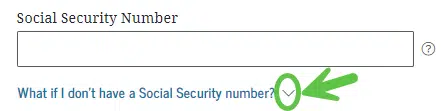
Then they will check the box to confirm “I do not have a Social Security Number.”

- Current address
- Contact Information (not used by another StudentAid account)
- Email (do not use your school email – use a personal one because your school email will be deactivated once you graduate)
- Cell phone number
Each person creating an account must choose:
- Username and password
- Communication preferences
- Challenge questions (to help you log back in if you forget your username or password)
- Multi-factor authentication preferences (you can choose email, phone, or an authenticator app)
Identity Verification
Once you create your account, FSA will verify your identity (make sure your information is correct and you are who you say you are). If you have an SSN, your identity will be verified through the Social Security Administration (SSA). Your identity will instantly be verified with the SSA. There is no longer a 3-5 day waiting period.
If your parent or spouse does not have an SSN, they will be asked to answer knowledge-based identity questions to verify their identity.
IMPORTANT
Make sure you store your (and your parent’s) username and password somewhere secure where you will be able to find it again. You will need it every year you are in college!
Step 4: Complete Application
More Resources
Note: You can change the language on the FSA website to Spanish by clicking Español in the top right corner of the website
- If your high school has a DSF Future Center, your DSF College Advisor can help you if you have questions.
- Log in / create account*
- Recover an account*
- Worksheet to help you create a StudentAid.gov account*
- Parent StudentAid.gov account worksheet*
- VIDEO: How to create a StudentAid.gov account if you don’t have a social security number (parents and spouses only)
- VIDEO: Why do my contributors and I need our own StudentAid.gov accounts?
- VIDEO: Create and Access your StudentAid.gov account
- FSA Account Creation Help*
- Financial Aid Terms You Should Know
*available in Spanish
